
Vision Forward Store
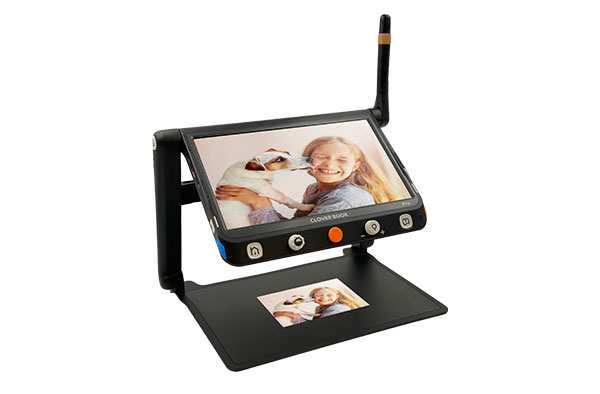
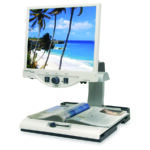
CloverBook Pro Advanced Electronic Magnifier | Low Vision
$2,995.00
Description
Experience powerful electronic magnification in a portable design with the CloverBook Pro Advanced Electronic Magnifier. Designed for people with low vision, the CloverBook Pro combines a large Full HD touchscreen, high-resolution camera, OCR and text-to-speech, distance viewing, and flexible contrast options in a foldable unit that can be used at home, school, work, or on the go.
With 1x to 60x magnification for close-up viewing, the CloverBook Pro can enlarge printed materials, photographs, labels, handwriting, and other objects. Its additional camera supports distance and self-viewing, providing greater flexibility than a conventional desktop magnifier.
Large 12.5-Inch Full HD Touchscreen
The CloverBook Pro features a 12.5-inch Full HD 1080p matte touchscreen that provides a generous viewing area for magnified text and images.
The matte display can help reduce distracting reflections, while the touchscreen provides an additional way to control the device for users who prefer touch navigation. Traditional tactile controls are also available.
Powerful 1x to 60x Magnification
The near-view camera provides a magnification range of approximately 1x to 60x, allowing users to select the level of enlargement that best suits the material being viewed.
The camera and live-panning features allow users to explore magnified material without constantly moving the document or the device.
Distance and Self-View Cameras
The CloverBook Pro includes a fold-out camera that can be used for distance viewing and self-viewing. Distance magnification extends to approximately 18x, making it possible to view objects farther away than the reading surface.
The self-view function can be useful for activities such as checking your appearance, while distance viewing can help with presentations, classroom boards, signs, and other objects across a room.
OCR and Text-to-Speech
One of the CloverBook Pro’s most useful accessibility features is its full-page optical character recognition (OCR) and text-to-speech capability.
The device can scan an entire 8.5 x 11-inch document and read the recognized text aloud. This can provide an alternative way to access printed information for users who have difficulty reading enlarged text visually.
Multiple Viewing Modes
The CloverBook Pro supports multiple viewing configurations, including:
- Near/reading view
- Distance view
- Self-view
- Split-screen viewing
Split-screen mode allows the near and distance cameras to be viewed simultaneously, which can be particularly useful in educational or presentation settings.
High-Contrast Viewing
In addition to natural-color viewing, the CloverBook Pro offers 16 high-contrast color modes. These settings can help users customize the appearance of text and images according to their individual visual preferences.
Brightness and contrast adjustments provide additional flexibility for different materials and lighting conditions.
Save and Review Images
The CloverBook Pro can save images for later viewing. This can be useful when you want to capture a document, photograph, or other material and review it again without keeping the original item under the camera.
Portable, Foldable Design
Although the CloverBook Pro provides many of the capabilities associated with a desktop video magnifier, it folds into a compact form for transportation and storage.
A protective carrying case is included, making it easier to move the device between home, school, work, and other locations.
Rechargeable Battery
The CloverBook Pro uses a detachable rechargeable battery. Depending on use and configuration, available product information indicates several hours of continuous operation, with approximately three hours required for a full recharge.
The user-replaceable battery design can also make long-term use more convenient.
Useful for School, Work, and Home
The CloverBook Pro can be used in a variety of environments. Students can use it to read textbooks, worksheets, handouts, and classroom presentations. At work, it can enlarge documents, forms, labels, and other printed materials. At home, it can support reading books, mail, recipes, medication labels, and everyday paperwork.
Specifications
- Large 12.5-inch Full High Definition (1080p) matte touchscreen
- high resolution camera for reading
- Close up magnification range goes from 1x-60x
- An innovative fold-out camera allows for distance and self-viewing
- Full Page Optical Character Recognition and Text-to-Speech
- Foldable and lightweight design – carry case included
- Both tactile buttons and touchscreen controls
- Distance and near cameras allow split-screen viewing
- Pan live images with the built-in joystick or touchscreen
- HDMI out allows for connection to a TV for larger viewing
- Save images and choose between 16 high contrast modes
- 3 hours use on a single charge – user rechargeable battery
Key Features
- 12.5-inch Full HD 1080p matte touchscreen
- Close-view magnification from 1x to 60x
- Distance magnification up to 18x
- High-resolution 4K reading camera
- Fold-out distance/self-view camera
- Full-page OCR
- Text-to-speech
- Scans full letter-size documents
- Near, distance, and self-view modes
- Split-screen viewing
- Live panning
- Touchscreen and tactile controls
- 16 high-contrast color modes
- Natural-color viewing
- Adjustable brightness
- Save and review images
- HDMI output for connection to a larger display
- Foldable, portable design
- Integrated reading and writing stand
- Detachable rechargeable battery
- Protective carrying case included
- Designed for people with low vision
Who Can Benefit
The CloverBook Pro may be especially useful for:
- People with low vision
- Students
- College and university students
- Professionals
- Seniors
- Teachers
- Readers
- People who have difficulty reading standard-size print
- Individuals who benefit from magnification and high contrast
- People who need portable electronic magnification
- Users who benefit from text-to-speech
- People who need both near and distance viewing
Try Before You Buy
The best way to find out if an assistive technology product works is to try it before you buy it. That’s why we offer no obligation free demonstrations. Contact an assistive technology specialist to learn more. You can also call us at 414-615-0103, or email us at .
Our state-of-the-art assistive technology center features a variety of leading electronic magnifiers, wearable devices and blindness products. To get an in-depth demonstration of a device, or discuss training, schedule an appointment with one of our assistive technology specialists. They will help you find the right technology, training and care solution.
Related products
-
Explorē 5 Portable Electronic Magnifier | HumanWare
Click for more details $845.00 Add to cart -
Acrobat HD Ultra Full HD Electronic Video Magnifier | Enhanced Vision
Click for more details Price range: $3,249.75 through $3,874.50 Select options This product has multiple variants. The options may be chosen on the product page -
TOPAZ EZ HD Desktop Video Magnifier | Freedom Scientific
Click for more details $3,235.00 Select options This product has multiple variants. The options may be chosen on the product page -
Merlin Ultra FHD Desktop Electronic Magnifier
Click for more details Price range: $3,937.50 through $4,247.25 Select options This product has multiple variants. The options may be chosen on the product page