
Vision Forward Store
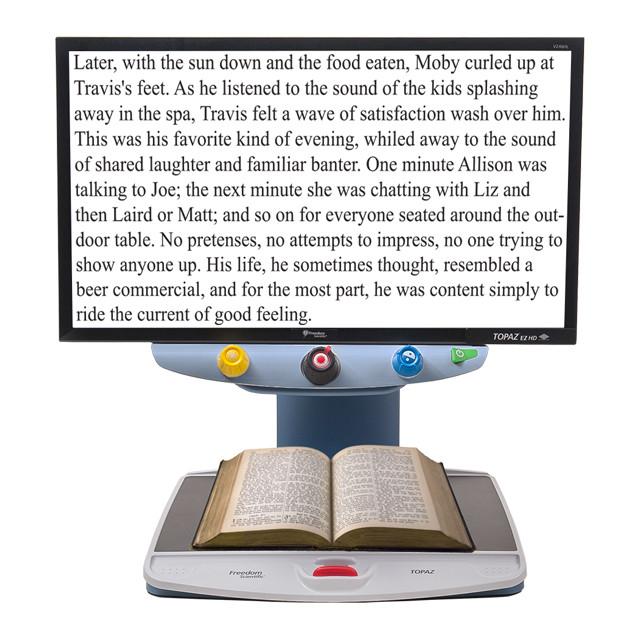
TOPAZ EZ HD Desktop Video Magnifier | Freedom Scientific
$3,235.00
Description
The TOPAZ EZ HD is an easy-to-use desktop video magnifier from Freedom Scientific designed to provide clear, high-definition magnification for people with low vision. Its straightforward controls and single-function buttons make it simple to adjust magnification, brightness, and color settings without navigating complicated menus.
The TOPAZ EZ HD features an HD camera that produces sharp images and crisp text while providing a wider field of view at lower magnification levels. This allows users to see more information on the screen at once, which can be useful when reading books, newspapers, magazines, documents, photographs, and other materials.
Available with either a 20-inch or 24-inch widescreen monitor, the TOPAZ EZ HD provides a large viewing area along with more than 8 inches of workspace beneath the camera. Its smooth XY reading table, adjustable swivel screen, LED lighting, and one-touch freeze-frame function make it suitable for reading, writing, crafts, hobbies, and other detailed visual tasks.
Key Features
- High-definition camera provides sharp images and crisp text.
- Magnification up to 64X on a 24-inch monitor according to Freedom Scientific’s current product page.
- 20-inch or 24-inch widescreen monitor options provide a large viewing area.
- 16 magnification levels allow users to select the image size that works best for their vision.
- Custom high-contrast color modes provide additional viewing options.
- Color-boost contrast helps enhance visual information.
- Brightly colored control buttons make the controls easier to identify.
- More than 8 inches of workspace beneath the camera provides room for writing and other activities.
- Smooth XY reading table makes it easier to move documents beneath the camera.
- 16 inches of horizontal table travel accommodates large-format documents.
- Table braking mechanism allows users to lock the reading table securely in place.
- Adjustable monitor height and angle supports comfortable viewing.
- Swivel screen allows users to position the display for their preferred viewing angle.
- LED lighting illuminates materials while helping reduce glare and reflections.
- One-touch freeze frame allows users to temporarily capture an image on screen.
- Autofocus camera automatically adjusts focus for a clear view.
- Adjustable screen brightness allows users to customize the display.
Benefits of the TOPAZ EZ HD
The TOPAZ EZ HD is designed around simplicity and ease of use. Each primary control performs a specific function, making it possible to adjust the device without working through complicated menus. This straightforward design can be particularly useful for users who want a desktop magnifier that they can operate quickly and independently.
The HD camera also allows users to work at lower magnification levels while maintaining a clear image. A lower magnification level can show more words, lines, or other information on the screen at one time, potentially reducing how frequently the reading table needs to be repositioned.
HD Image Quality
The high-definition camera produces a clear image with sharp details and crisp text. The wider field of view is designed to let users see more information at lower magnification levels, which can be useful when reading documents or working on detailed projects.
Simple, Color-Coded Controls
The TOPAZ EZ HD uses brightly colored, single-function controls. Users can make adjustments to magnification, brightness, and color without navigating complicated menus.
The device provides four primary color modes, along with custom high-contrast options and color-boost contrast to accommodate different viewing preferences.
Large Reading and Working Area
The TOPAZ EZ HD provides more than 8 inches of working space beneath the camera, giving users room to write, complete paperwork, work on crafts, or manipulate small objects.
Its XY table moves horizontally and vertically beneath the camera, while the table’s braking mechanism allows users to lock the table in place when they want it to remain steady.
Freeze-Frame Function
The one-touch freeze-frame button allows users to temporarily capture the image currently displayed on the screen. This can be useful when examining a photograph, viewing a label, or looking closely at a small object without needing to keep the item positioned beneath the camera.
LED Lighting
Two lights positioned on either side of the camera illuminate materials placed beneath it. The lighting is diffused to help reduce glare and reflections when viewing shiny materials such as magazines and photographs.
Everyday Uses
Reading Books and Newspapers
Magnify books, newspapers, magazines, and other printed materials while adjusting the image size, brightness, and color to suit your viewing needs.
Completing Paperwork
Use the large reading area and adjustable magnification when filling out forms, reading bills, writing checks, or completing other paperwork.
Writing
The generous workspace beneath the camera provides room to write while viewing your work on the monitor.
Viewing Photographs
Magnify photographs and examine details using the HD camera and adjustable color modes.
Crafts and Hobbies
The TOPAZ EZ HD can provide magnification for detailed hobbies, crafts, puzzles, games, and other activities.
Reading Large-Format Documents
The XY table provides substantial horizontal travel, making it easier to move large documents beneath the camera while reading.
Who Is the TOPAZ EZ HD For?
The TOPAZ EZ HD is designed for people with low vision who need desktop magnification for reading, writing, hobbies, and other detailed visual activities.
It may be useful for:
- Adults with low vision
- Seniors who need additional magnification
- Students
- Professionals
- People who regularly read printed materials
- Individuals who enjoy crafts and hobbies
- Users who prefer simple, physical controls
- People who benefit from high-contrast viewing options
Try Before You Buy
The best way to find out if an assistive technology product works is to try it before you buy it. That’s why we offer no obligation free demonstrations. Contact an assistive technology specialist to learn more. You can also call us at 414-615-0103, or email us at .
Our state-of-the-art assistive technology center features a variety of leading electronic magnifiers, wearable devices and blindness products. To get an in-depth demonstration of a device, or discuss training, schedule an appointment with one of our assistive technology specialists. They will help you find the right technology, training and care solution.
Related products
-
explorē 8 HD Portable Electronic Magnifier | HumanWare
Click for more details $1,299.00 Add to cart -
3X Red Ladybug Pendant Magnifier
Click for more details $11.95 Add to cart -
Eschenbach 10X Lighted Mobilent Magnifier | Portable LED Magnifier
Click for more details $108.90 Add to cart -
Merlin Elite Pro Electronic Magnifier with OCR/TTS | Enhanced Vision
Click for more details $4,872.00 Add to cart